
 纠删码计算器
 参考硬件
参考硬件
使用 R、H2O 和 MinIO 进行日志文件异常检测的完整工作流程


在企业环境中处理日志文件并非易事。人工分析需要专业知识且耗时,成本高且效率低。相反,许多组织应用机器学习 (ML) 技术来有效且高效地自动处理传入的日志。
这种类型的工作流程由多个处理步骤组成。当通知要处理的工件(在本例中为日志文件块)到达时,可以触发每个步骤。如果需要审计,工件会在工作流中的每个步骤之后保存一段时间,然后才会被删除。这种架构提供了一个巨大的优势,因为它允许工作流中的每个步骤都是无状态的。状态包含在工件本身中,因为它在处理管道中前进。
通过无状态转换,每个步骤都可以根据需要通过部署更多处理单元(给定工作流步骤的代码的额外实例)来独立扩展。日志文件分析等工作流非常适合 Kubernetes 的动态扩展(向上和向下)特性,但 Kubernetes 没有必要利用这种方法。
在本教程中,我们将首先开发必要的组件、训练模型并创建一个具有生产能力的日志处理工作流,然后再将它们组合在一起。
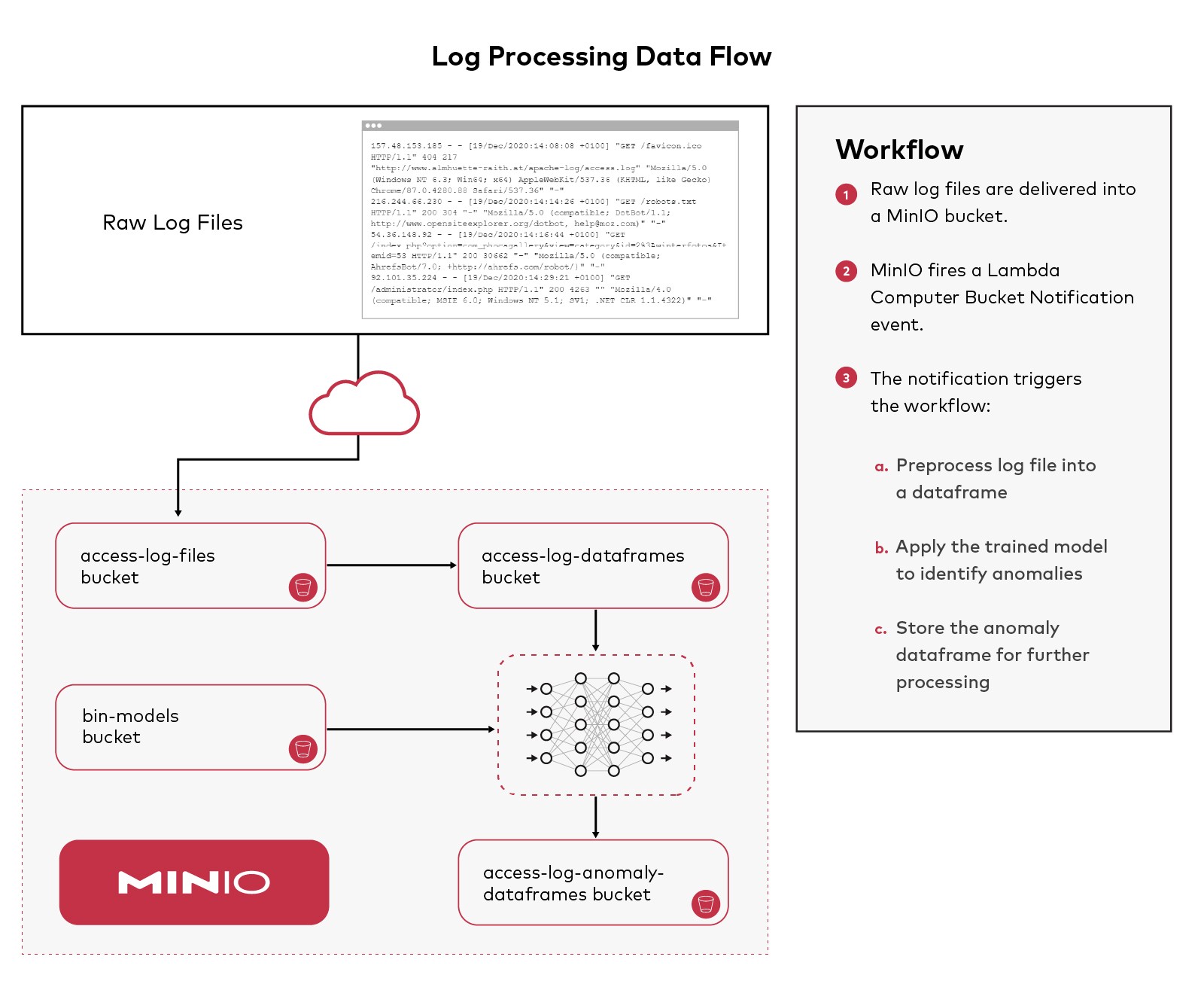
异常检测是机器学习 (ML) 的一个领域,功能强大且适用于许多领域。在上一篇文章(使用 R、H2O 和 MinIO 进行异常检测)中,我深入解释了异常检测如何使用 MNIST 数据集进行工作。在那篇文章中,我们将使用H2O、R和Rstudio,我们将应用相同的技术来检测 Apache 访问日志文件中的异常。如果您正在寻找有关使用这些工具进行异常检测的更多基础知识,请参阅之前的帖子。
Apache 访问日志存储有关在 Apache Web 服务器上发生的请求的信息。例如,当有人访问您的网站或发出 http 或 https 请求时,系统会存储一个日志条目以向 Apache Web 服务器管理员提供访问者的 IP 地址、他们查看的页面、状态代码等信息。请求、使用的浏览器或响应的大小。
分析这些文件的原因有很多。它们是 Web 服务器请求的记录,并且很重要,因为它们提供了对那些向 Web 服务器发出请求的人的使用模式的洞察力。一个有趣的方面是可能具有恶意性质的请求的数量和模式。能够识别不寻常的请求模式可以提供对潜在攻击的洞察力。
MinIO是高性能软件定义的 S3 兼容对象存储,使其成为 Amazon S3 的强大而灵活的替代品。S3 API 是当前使用 ML 和相关数据集的标准。MinIO 将用于保存此工作流中的工件。为了跟进,请安装 R 和 RStudio,访问 H2O 集群,如果您尚未运行 MinIO,请下载并安装它。
这篇博文旨在作为为日志文件开发基于 AI/ML 的自定义异常检测系统的起点。每个组织通常会自定义他们部署的扫描类型和检测方法。Apache 访问日志文件包含对 Apache Web 服务器的所有入站访问的详细信息。格式可以自定义,因此如果此处使用的示例日志与您组织的日志文件格式不匹配,请适当调整代码。
示例日志文件
本教程使用大约 1.5GB 的公开日志文件。
示例日志文件中的示例行:
157.48.153.185 - - [19/Dec/2020:14:08:06 +0100] "GET /apache-log/access.log HTTP/1.1" 200 233 "-" "Mozilla/5.0 (Windows NT 6.3; Win64; x64) AppleWebKit/537.36 (KHTML, like Gecko) Chrome/87.0.4280.88 Safari/537.36" "-"
157.48.153.185 - - [19/Dec/2020:14:08:08 +0100] "GET /favicon.ico HTTP/1.1" 404 217 "http://www.almhuette-raith.at/apache-log/access.log" "Mozilla/5.0 (Windows NT 6.3; Win64; x64) AppleWebKit/537.36 (KHTML, like Gecko) Chrome/87.0.4280.88 Safari/537.36" "-"
216.244.66.230 - - [19/Dec/2020:14:14:26 +0100] "GET /robots.txt HTTP/1.1" 200 304 "-" "Mozilla/5.0 (compatible; DotBot/1.1; http://www.opensiteexplorer.org/dotbot, help@moz.com)" "-"
54.36.148.92 - - [19/Dec/2020:14:16:44 +0100] "GET /index.php?option=com_phocagallery&view=category&id=2%3Awinterfotos&Itemid=53 HTTP/1.1" 200 30662 "-" "Mozilla/5.0 (compatible; AhrefsBot/7.0; +http://ahrefs.com/robot/)" "-"
92.101.35.224 - - [19/Dec/2020:14:29:21 +0100] "GET /administrator/index.php HTTP/1.1" 200 4263 "" "Mozilla/4.0 (compatible; MSIE 6.0; Windows NT 5.1; SV1; .NET CLR 1.1.4322)" "-"
创建 MinIO 桶
我们将在 MinIO 中创建几个桶来保存工作流执行时的各种工件,如 MinIO 控制台中所示
您可以在下方看到在 MinIO 控制台中创建的存储桶。
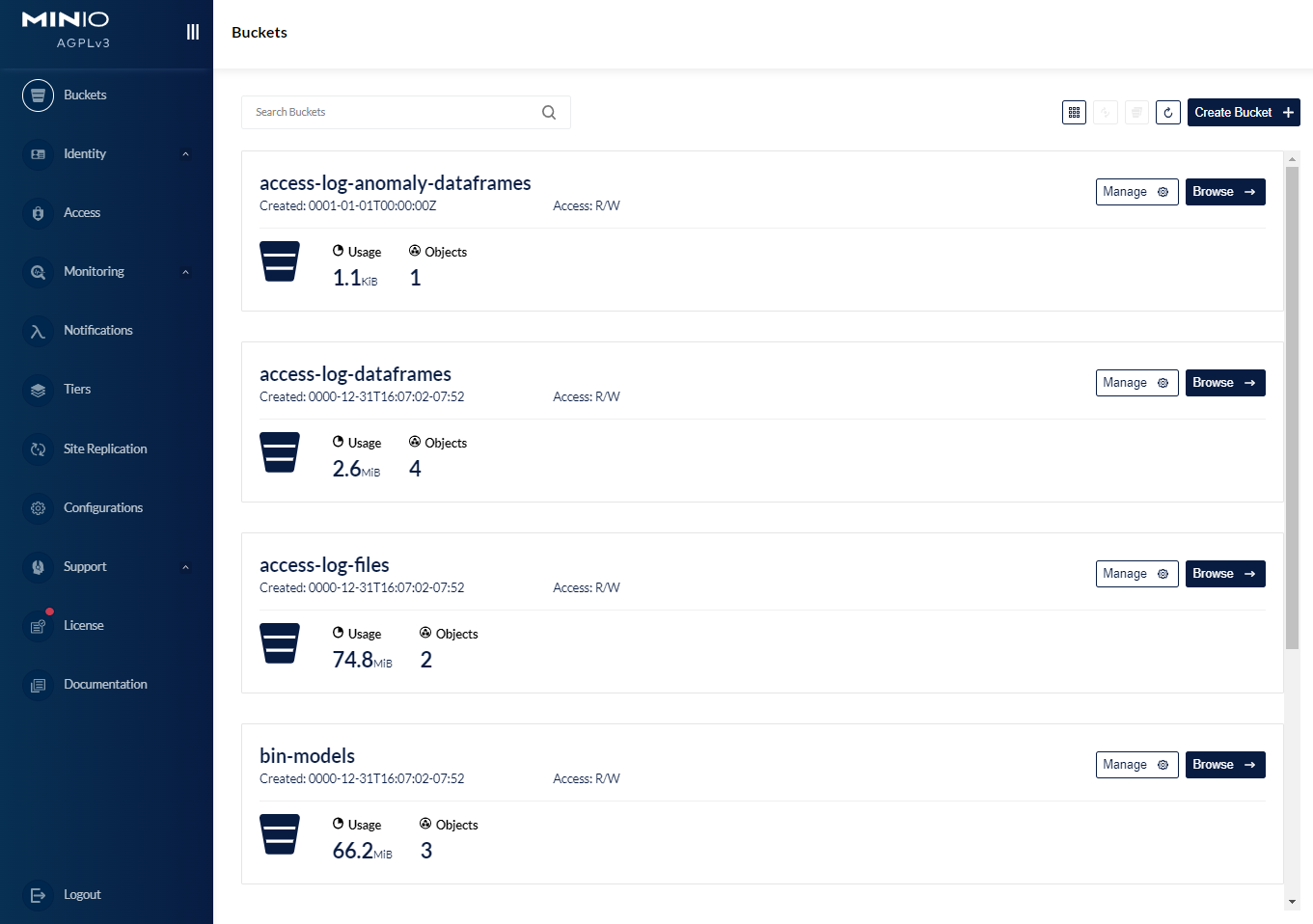
我们使用的第一个桶是access-log-files. 这是日志文件所在的位置。它们可以使用多种机制来交付,Apache Kafka 是我们在生产中经常看到的一种机制(有关更多详细信息,请参阅MinIO 集成)。MinIO Lambda Compute Bucket Notification将用于在每个文件到达并写入 MinIO 存储桶时触发处理。
底层功能
在我们可以运行生产日志文件处理工作流程之前,我们需要一个训练有素的异常检测模型来应用。训练模型需要创建一个训练集——一个包含用于训练的日志请求实例的 R 数据框。
对于本教程,所需的库调用已收集到一个名为 sources 的文件中。该文件packages.R加载所需的库。该文件PreProcessLogFile.R包含一个将传入日志块转换为数据帧的函数。代码读取数据,删除一些列,重命名其他列,操纵时间组件,并使用外部数据源https://www.maxmind根据源 IP 地址使用大洲和国家/地区信息扩充日志数据。com。在将原始数据处理成更有用的数据帧之后,我们将把数据帧存储在桶中access-log-dataframes。
==== packages.R
#load necessary libraries

if (!require("plumber")) {
  install.packages("plumber")
  library(plumber)
}

if (!require("jsonlite")) {
  install.packages("jsonlite")
  library(jsonlite)
}


if (!require("aws.s3")) {
  install.packages("aws.s3")
  library(aws.s3)
}

if (!require("rgeolocate")) {
  install.packages("rgeolocate")
  library(rgeolocate)
}

if (!require("lubridate")) {
  install.packages("lubridate")
  library(lubridate)
}


if (!require("h2o")) {
  install.packages("h2o")
  library(h2o)
}
==== end packages.R
==== PreProcessLogFile.R
PreProcessLogFile <- function (srcBucket,srcObject,destBucket,destObject) {
# set the credentials this r instances uses to access minio
Sys.setenv("AWS_ACCESS_KEY_ID" = "minioadmin", # enter your credentials
"AWS_SECRET_ACCESS_KEY" = "minioadmin", # enter your credentials
"AWS_DEFAULT_REGION" = "",
"AWS_S3_ENDPOINT" = "10.0.0.10:9000")
b <- get_bucket(bucket = srcBucket, use_https = F, region = "")
df_access <- aws.s3::s3read_using(FUN = read.table, object = srcObject, bucket = b,
opts = list(use_https = FALSE, region = ""))
# join the time string back together
df_access$V4 <- paste(df_access$V4, df_access$V5)
# remove some noise
drops <- c("V2", "V3", "V5", "V11")
df_access <-df_access[, !(names(df_access) %in% drops)]
# rename the columns
names(df_access)[1] <- "client_ip"
names(df_access)[2] <- "access_time"
names(df_access)[3] <- "client_request"
names(df_access)[4] <- "status_code"
names(df_access)[5] <- "response_size"
names(df_access)[6] <- "referrer"
names(df_access)[7] <- "user_agent"
# load the Geolocation data
# https://www.maxmind.com
ips<- df_access$client_ip
maxmind_file <- "data/Geo/Geolite2-Country_20220517/Geolite2-Country.mmdb"
country_info <- maxmind(
ips,
maxmind_file,
fields = c("continent_name", "country_name", "country_code")
)
# add some columns for location information
df_access$continent_name <- as.factor(country_info$continent_name)
df_access$country_name <- as.factor(country_info$country_name)
df_access$country_code <- as.factor(country_info$country_code)
# use lubridate to help coerce the access_time string into something usable
# we might be interested in what day of week, hour, min, second an access occurred - as factors
df_access$access_time <- dmy_hms(df_access$access_time)
df_access$wday <- wday(df_access$access_time)
df_access$access_hour <- as.factor(format(df_access$access_time, format = "%H"))
df_access$access_min <- as.factor(format(df_access$access_time, format = "%M"))
df_access$access_sec <- as.factor(format(df_access$access_time, format = "%S"))
# since trying to train an identity function for anomaly detection using the
# exact access_time is difficult, and doesn't really help, remove the access_time
df_access <- subset(df_access, select = -c(access_time))
# all the inputs need to be numeric or factor, so clean up the rest
df_access$client_ip <- as.factor(df_access$client_ip)
df_access$client_request <- as.factor(df_access$client_request)
df_access$status_code <- as.factor(df_access$status_code)
df_access$response_size <- as.numeric(df_access$response_size)
df_access$referrer <- as.factor(df_access$referrer)
df_access$user_agent <- as.factor(df_access$user_agent)
# save off the munged data frame - don't want to do this pre-processing again
b <- get_bucket(bucket = destBucket, region = "", use_https = F)
s3write_using(df_access, FUN = saveRDS, object = destObject, bucket = b,
opts = list(use_https = FALSE, region = "", multipart = TRUE))
}
==== end PreProcessLogFile.R训练异常检测自动编码器
一旦数据组织好并放入数据框中,我们就可以使用 H2O 相当轻松地训练深度学习自动编码器。该过程是读取数据帧,将其拆分以进行训练和测试,识别预测变量,最后训练模型。一旦模型经过训练,它就会被保存回bin-modelsMinIO 存储桶中,以供在工作流中使用。如何实现这一点,以及异常是什么以及自动编码器如何检测它们,之前在使用 R、H2O 和 MinIO 的异常检测中讨论过。
==== TrainModel.R
source("packages.R")

source("PreProcessLogFile.R")

# set the credentials this r instances uses to access minio
Sys.setenv("AWS_ACCESS_KEY_ID" = "minioadmin", # enter your credentials
           "AWS_SECRET_ACCESS_KEY" = "minioadmin", # enter your credentials
           "AWS_DEFAULT_REGION" = "",
           "AWS_S3_ENDPOINT" = "10.0.0.10:9000")


# initialize the h2o server
# h2o.init(ip="10.0.0.10", port=54321,startH2O=FALSE)
# h2o.set_s3_credentials("minioadmin", "minioadmin")
h2o.init(jvm_custom_args = "-Dsys.ai.h2o.persist.s3.endPoint=http://10.0.0.10:9000 -Dsys.ai.h2o.persist.s3.enable.path.style=true")
h2o.set_s3_credentials("minioadmin", "minioadmin")

# turn the log chunk into a dataframe
bucketName <- "access-log-files"
objectName <- "access_sample.log"
destBucketName <- "access-log-dataframes"
destObjectName <- "access-log-dataframe.rda"
PreProcessLogFile(bucketName, objectName, destBucketName, destObjectName)


#load the previously pre-processed dataframe
b <- get_bucket(bucket = 'access-log-dataframes', use_https = F, region ="")
df_access <-s3read_using(FUN = readRDS, object = "access-log-200000.rda", bucket = b,
                         opts = list(use_https = FALSE, region = ""))

# load into h2o and convert into h2o binary format
df_access.hex = as.h2o(df_access, destination_frame= "df_access.hex")

# split this dataframe into a train and test set
splits <- h2o.splitFrame(data = df_access.hex,
                         ratios = c(0.6),  #partition data into 60%, 40%
                         seed = 1)  #setting a seed will guarantee reproducibility
train_hex <- splits[[1]]
test_hex <- splits[[2]]

#save the validate set to csv, going to use it in another step
b <- get_bucket(bucket = 'access-log-dataframes', region = "", use_https = F)
s3write_using(test_hex, FUN = saveRDS, object = "access-log-test.rda", bucket = b,
              opts = list(use_https = FALSE, region = "", multipart = TRUE))

predictors <- c(1:13)

# use the training data to create a deeplearning based autoencoder model
# about 3 million tunable parameters with the factorization of the fields
ae_model <- h2o.deeplearning(x=predictors,
                             training_frame=train_hex,
                             activation="Tanh",
                             autoencoder=TRUE,
                             hidden=c(50),
                             l1=1e-5,
                             ignore_const_cols=FALSE,
                             epochs=1)

# save the model as bin
model_path <- h2o.saveModel(ae_model, path = "s3://bin-models/apache-access-log-file-autoencoder-bin")


==== end TrainModel.R
应用异常检测自动编码器
一旦我们有了训练有素的模型,我们就可以在新日志块到达时将该模型应用于它们以识别异常。下面是一个名为的文件IdentifyAnomalies.R,其中包含应用的函数。
==== IdentifyAnomalies.R

IdentifyAnomalies <- function(srcBucketName, srcObjectName, destBucketName, destObjectName, modelBucket, modelName) {

  # set the credentials this r instances uses to access minio
  Sys.setenv("AWS_ACCESS_KEY_ID" = "minioadmin", # enter your credentials
             "AWS_SECRET_ACCESS_KEY" = "minioadmin", # enter your credentials
             "AWS_DEFAULT_REGION" = "",
             "AWS_S3_ENDPOINT" = "<MinIO-IP-Address>:9000")


  # initialize the h2o server
  h2o.init(ip="<MinIO-IP-Address>", port=54321,startH2O=FALSE)
  h2o.set_s3_credentials("minioadmin", "minioadmin")


  # load the model that was previously saved
  # the name of the model needs to have been saved off somewhere so this specific model can be loaded
  model_path <- paste0("s3://",modelBucket,"/",modelName)
  ae_model <- h2o.loadModel(model_path)


  #load the previously pre-processed dataframe
  b <- get_bucket(bucket = srcBucketName, use_https = F, region ="")
  test_access <-s3read_using(FUN = readRDS, object = srcObjectName, bucket = b,
                             opts = list(use_https = FALSE, region = ""))

  # load into h2o and convert into h2o binary format
  test_hex = as.h2o(test_access, destination_frame= paste0(srcObjectName,".hex"))


  # h2o.anomaly computes the per-row reconstruction error for the test data set
  # (passing it through the autoencoder model and computing mean square error (MSE) for each row)
  test_rec_error <- as.data.frame(h2o.anomaly(ae_model, test_hex))

  listAccesses <- function(data, rec_error, rows) {
    row_idx <- order(rec_error[,1],decreasing=F)[rows]
    my_rec_error <- rec_error[row_idx,]
    my_data <- as.data.frame(data[row_idx,])

  }


  # These are the biggest outliers
  num_rows = nrow(test_hex)
  test_r<-as.data.frame(test_hex)

  beg <- floor(num_rows-20)
  end <- num_rows
  anomaly_df <- listAccesses(test_r, test_rec_error, c(beg:end))
  anomaly_df <- anomaly_df[,c("country_name","wday","access_hour")]


  # write this dataframe into the next bucket

  b <- get_bucket(bucket = destBucketName, region = "", use_https = F)
  s3write_using(anomaly_df, FUN = saveRDS, object = destObjectName, bucket = b,
                opts = list(use_https = FALSE, region = "", multipart = TRUE))
}

==== end IdentifyAnomalies.R
使用 webhook 构建推理工作流
MinIO Lambda Compute Bucket Notification 用于构建事件驱动的工作流。当日志文件到达时,会创建一个事件。这些事件通过对新日志文件块的推理处理触发工件的进展。MinIO Lamba Compute Bucket Notification可以与许多通知机制集成。对于本教程,我们将使用与 webhook 的集成。R 支持使用Plumber 包创建 RESTful web 界面。要使用plumber,文件需要定义访问方法/端点元组以及要为每个端点执行的功能代码。以下是Plumber.R本教程的文件。管道工来源之前用函数描述的另外两个文件PreProcessLogFile()和IdentifyAnomalies()。此文件的顶部是 JSON 存储桶通知事件的示例。
Plumber将此带注释的 R 脚本转换为可执行的 Web 服务器。下面的端点在Plumber.R文件中定义
==== Plumber.R

# Plumber.R

# Each of these has a function used below
source("PreProcessLogFile.R")
source("IdentifyAnomalies.R")


#* Log some information about the incoming request
#* @filter logger
function(req){
  cat(as.character(Sys.time()), "-",
      req$REQUEST_METHOD, req$PATH_INFO, "-",
      req$HTTP_USER_AGENT, "@", req$REMOTE_ADDR, "\n")
  plumber::forward()
}

#* endpoint handler for the MinIO bucket notifications
#* @post /
function(req){

  json_text <- req$postBody

  # {
  #   "EventName": "s3:ObjectCreated:Put",
  #   "Key": "access-log-files/access_sample_short.log",
  #   "Records": [
  #     {
  #       "eventVersion": "2.0",
  #       "eventSource": "minio:s3",
  #       "awsRegion": "",
  #       "eventTime": "2022-08-10T18:19:38.663Z",
  #       "eventName": "s3:ObjectCreated:Put",
  #       "userIdentity": {
  #         "principalId": "minioadmin"
  #       },
  #       "requestParameters": {
  #         "principalId": "minioadmin",
  #         "region": "",
  #         "sourceIPAddress": "<MinIO-IP-Address>"
  #       },
  #       "responseElements": {
  #         "content-length": "0",
  #         "x-amz-request-id": "170A0EB32509842A",
  #         "x-minio-deployment-id": "e88d6f13-657f-4641-b349-74ce2795d730",
  #         "x-minio-origin-endpoint": "<MinIO-IP-Address>:9000"
  #       },
  #       "s3": {
  #         "s3SchemaVersion": "1.0",
  #         "configurationId": "Config",
  #         "bucket": {
  #           "name": "access-log-files",
  #           "ownerIdentity": {
  #             "principalId": "minioadmin"
  #           },
  #           "arn": "arn:aws:s3:::access-log-files"
  #         },
  #         "object": {
  #           "key": "access_sample_short.log",
  #           "size": 1939,
  #           "eTag": "bb48fe358c017940ecc5fb7392357641",
  #           "contentType": "application/octet-stream",
  #           "userMetadata": {
  #             "content-type": "application/octet-stream"
  #           },
  #           "sequencer": "170A0EB3F219CCC4"
  #         }
  #       },
  #       "source": {
  #         "host": "<MinIO-IP-Address>",
  #         "port": "",
  #         "userAgent": "MinIO (linux; amd64) minio-go/v7.0.34"
  #       }
  #     }
  #   ]
  # }

  # extract the raw JSON into a data structure
  j <- fromJSON(json_text, flatten = TRUE)

  # get the eventName, the bucketName, and the objectName
  # for this example we know it's a put so we can ignore the eventName
  eventName <- j[["EventName"]]

  bucketName <- j[["Records"]]$s3.bucket.name
  objectName <- j[["Records"]]$s3.object.key


  destBucketName <- "access-log-dataframes"
  destObjectName <- "access-log-dataframe.rda"


  # turn the log chunk into a dataframe
  PreProcessLogFile(bucketName, objectName, destBucketName, destObjectName)

  # the destination for this step becomes the src for the next
  # rename then just to maintain sanity
  srcBucketName <- destBucketName
  srcObjectName <-destObjectName

  destBucketName <- "access-log-anomaly-dataframes"
  destObjectName <- "access-log-anomaly-dataframe.rda"

  modelBucketName <- "bin-models/apache-access-log-file-autoencoder-bin"
  modelName <- <The-Name-Of-The-Built-Model>


  # use the trained model and identify anomalies in the log chunk that just arrived
  IdentifyAnomalies(srcBucketName, srcObjectName, destBucketName, destObjectName, modelBucketName, modelName)

}

==== end Plumber.R
一旦我们有了定义此 RESTful Web 界面的端点的文件,我们就需要创建一个文件来解析带注释的脚本并启动服务器侦听。我们将创建文件Server.R来完成此操作。
==== Server.R
# the REST endpoint server

#source the required packages libraries
source("packages.R")

# process the Plumber.R file and show the valid endpoints
root <- pr("Plumber.R")
root

# make the endpoints active
root %>% pr_run(host = "<REST-endpoint-IP-Address>", port = 8806)


==== end Server.R
我们已将 R 配置为充当 RESTful Web 服务器,通过 webhook 通知存储桶事件。我们需要通过在 R Studio 中运行来启动 Web 服务器Server.R。我们这样做是因为当我们尝试配置 webhook 时,MinIO 将验证 Web 服务器是否存在并且正在运行。服务器运行后,我们可以配置 MinIO 以使用 webhook。
使用 webhook 配置 Lambda 计算桶通知
配置 MinIO 通知有两个步骤。首先是将 MinIO 集群中的端点配置为通知的目的地,这是使用 MinIO mc 客户端完成的。在我的例子中,webhook 侦听器在我的笔记本电脑上运行,IP 地址为 192.168.1.155,端口为 8806。请根据您的环境进行调整。
mc admin config set myminio notify_webhook:preProcessLogFiles queue_limit="0" queue_dir="" endpoint="http://192.168.1.155:8806"
设置此配置后,您将需要重新启动 MinIO 集群。
第二步是配置 MinIO 应该何时通知的细节。当一个对象被放入myminio/access-log-files桶中时,就会发生通知。
mc event add myminio/access-log-files arn:minio:sqs::preProcessLogFiles:webhook --event put
我们已经为工作流程奠定了基础。当将日志文件放入存储access-log-files桶时,会触发上面的代码将日志文件转换为数据帧,然后应用经过训练的模型来识别 http 请求中的异常。
事件驱动的 ML 异常工作流在行动
接下来,我们将一个日志文件复制到access-log-files存储桶中以触发工作流。
我从整个样本文件中创建了一个只有 300k 行的小(呃)日志文件。当我将其放入存储桶中时,MinIO 会发送一个通知事件来启动异常检测工作流程。
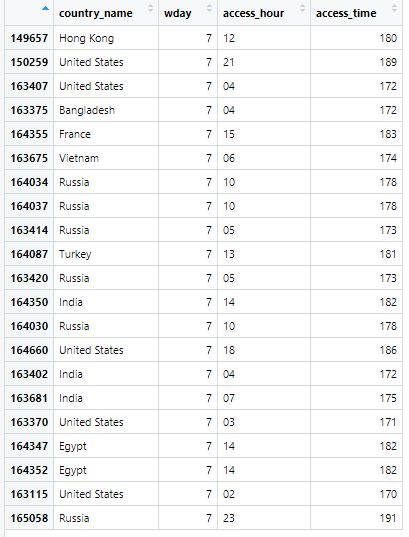
该IdentifyAnomalies()函数创建并保存一个数据框来保存异常——那些具有最高重建错误的实例。当我将较小的示例日志文件复制到存储access-log-files桶时,它启动了工作流程。结果是anomalies_df数据帧被写入了桶。在生产工作流程中,此数据帧的到达可能会触发 Lambda Compute Bucket Notification 以进一步处理此数据帧的内容,例如将这些行添加到系统以进一步检查这些请求。
以下是基于经过训练的深度学习自动编码器重建错误最高的 21 个请求。我减少了列数,以便可以轻松检查它们。请记住,作为异常仅表示所考虑的实例存在于输入向量空间中,与用于训练异常检测自动编码器的训练数据相距一定距离。因此,使用代表正常值范围的训练实例对自动编码器进行训练非常重要。应进一步检查这些具有高重建错误的实例,以确定它们是否是一个问题。
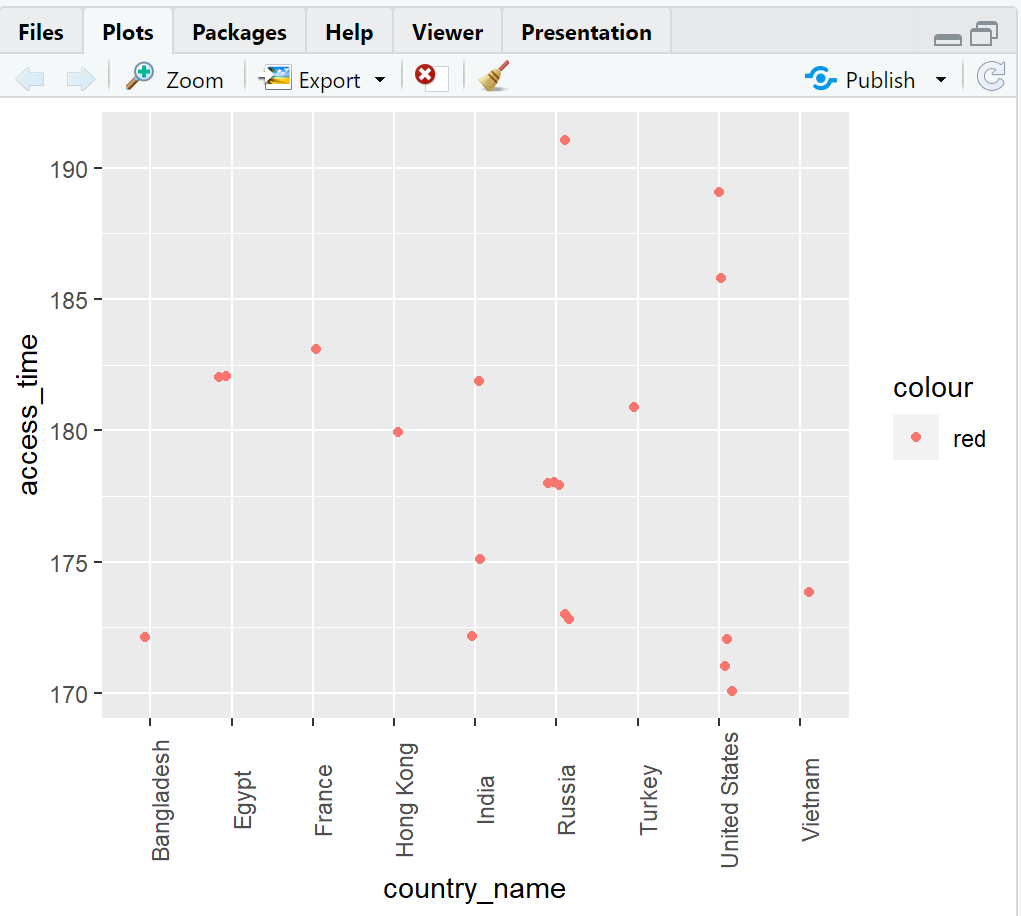
虽然在生产工作流程中不会这样做,但我们也可以使用以下脚本直观地检查这些内容,看看是否有明显的模式:
==== PlotAnomalies.R
library(aws.s3)
library(ggplot2)


# set the credentials this r instances uses to access minio
Sys.setenv("AWS_ACCESS_KEY_ID" = "minioadmin", # enter your credentials
           "AWS_SECRET_ACCESS_KEY" = "minioadmin", # enter your credentials
           "AWS_DEFAULT_REGION" = "",
           "AWS_S3_ENDPOINT" = "<MinIO-IP-Address>:9000")


b <- get_bucket(bucket = "access-log-anomaly-dataframes", region = "", use_https = F)
df <- s3read_using(FUN = readRDS, object = "access-log-anomaly-dataframe.rda", bucket = b,
              opts = list(use_https = FALSE, region = "", multipart = TRUE))


# now lets look at the results
df$access_time <- (df$wday*24) +  as.numeric(as.character(df$access_hour))


jitter <- position_jitter(width = 0.2, height = 0.2)
p<-ggplot() +
  layer(data = df,
        stat = "identity",
        geom = "point",
        mapping = aes(x = country_name, y = access_time, color = "red"),
        position = jitter) +
  theme(axis.text.x = element_text(angle = 90))

plot(p)


===== end PlotAnomalies.R当条目按国家和access_time(这里access_time是wday * 24 + access_hour)绘制时,我们开始看到一些聚类:
我们即将结束本教程,但重要的是要了解这并不是日志文件分析工作流程的结束。这篇博文涵盖了获取原始日志文件,将其转换为有用的数据帧,然后训练异常检测深度学习自动编码器并保存训练模型。然后,我们使用日志预处理代码并应用经过训练的模型对新日志块进行推理,利用 MinIO Lambda Compute Bucket Notification 来驱动工作流。
日志文件异常检测工作流程入门
从正确的工具开始可以简化构建 ML 数据管道,减少从原始数据中获得洞察力所需的时间和精力。
这篇博文中重点介绍的技术——R、H2O 和 MinIO——构成了一个强大、灵活且快速的 ML 工具箱。本教程提供了一个使用标准化日志文件格式进行异常检测的示例。处理日志文件数据必然涉及以合理的方式预处理原始数据——并且“合理”的定义不断发展,因为这是一个正在进行的研究领域。无论您在组织中如何定义合理,MinIO 都是事件驱动数据预处理和 ML 数据管道的强大基础工具。
立即下载 MinIO并构建您的 ML 工具包。如果您有任何问题,请发送电子邮件至 sales@minio.org.cn,或加入MinIO slack 频道并提问。